










Upwork Account Phone Number Verification: How to Protect Your Privacy From Day One
Signing up for Upwork feels straightforward until you reach the phone verification step. Suddenly, your personal number becomes part of the equation — and not everyone is comfortable with that. Between spam risks, data leaks, and long-term account linking, upwork phone verification raises more questions than most freelancers expect.
For some, the problem is practical: the SMS never arrives, or the system shows an error. For others, it’s about privacy — once a number is attached to an account, it tends to stay there. Understanding how Upwork treats phone numbers helps you make calmer decisions before hitting “verify.”
It’s also worth remembering that you can use online platforms while staying in control of your personal data. Virtual phone numbers for Upwork from Grizzly SMS let you register services without tying everything to one real SIM. Affordable pricing, a wide choice of countries and platforms, full anonymity, flexible payment methods, and a responsive support team make this approach feel reasonable rather than extreme.
Upwork Phone Verification: Why the Platform Requires Your Number
Upwork uses phone verification as part of its trust and security system. From their perspective, a phone number helps confirm that a real person is behind the profile.
However, this also creates side effects:
- numbers become long-term identifiers
- reused numbers may carry history
- personal data gets linked across accounts
That’s why upwork account phone number requirements often feel heavier than a simple SMS check.
Upwork SMS Verification Issues and Common Errors
Not all verifications go smoothly. Upwork SMS verification can fail for reasons that aren’t always obvious.
Common problems include:
- delayed or missing messages
- regional delivery issues
- previously used numbers
- temporary carrier blocks
When users see upwork number not working, the cause is often outside their control — and retrying the same number rarely helps.
Why Using a Personal Phone Number Isn’t Always Ideal
Your real number feels safe because it’s familiar. Over time, though, it becomes a single point of exposure.
Potential downsides:
- increased spam risk
- long-term account linking
- difficulty replacing the number later
- higher impact if the account is compromised
Once attached, removing a personal number from an Upwork account isn’t always simple.
How Virtual Numbers Help Protect Privacy on Upwork
One practical option is using a virtual number during registration. A temp phone number for Upwork can also be used for other online services when privacy matters, including freelance platforms.
Virtual numbers help because:
- they aren’t tied to your personal identity
- they reduce long-term exposure
- they keep your real number offline
- they limit damage if data is ever leaked
This approach isn’t about bypassing rules — it’s about keeping control over what you share.
How to Verify an Upwork Account Using Grizzly SMS
Nothing technical is required. Everything works directly through your browser — no SIM cards, no extra apps, fast and anonymous, with reliable SMS delivery.
- Register on Grizzly SMS
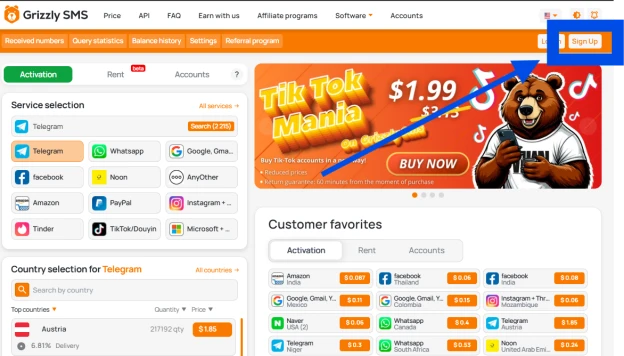
- Top up your balance using a convenient payment method
- Select Upwork
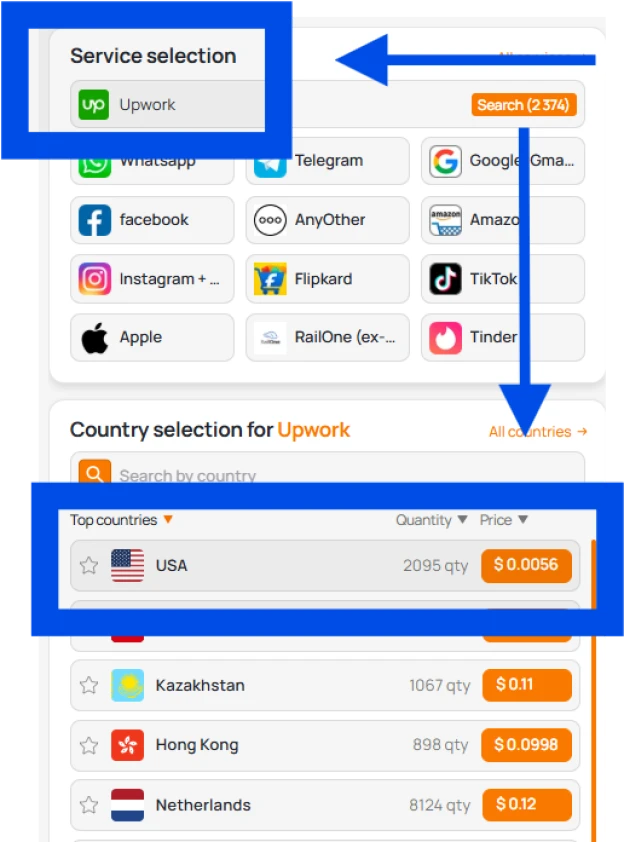
- Choose a suitable mobile operator country (for example, United States)
- Receive a phone number and copy it
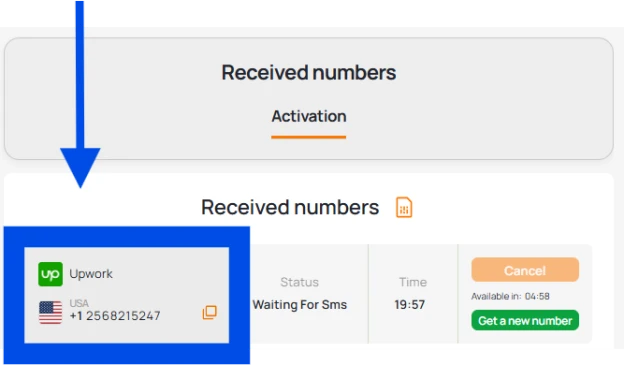
- Enter it during Upwork registration
- Get the SMS code in your Grizzly SMS dashboard
Secure and Fast — Why Users Prefer Temp Numbers for Upwork
- Instant number activation
- No need to buy SIM cards or install apps
- Strong compatibility with global platforms
- Pay only for what you actually use
- Full anonymity
- Simple and intuitive interface
- Access from anywhere in the world
Final Thoughts
Upwork phone verification isn’t going away, but how you handle it matters. Using a personal phone number might seem easiest in the moment, yet it often creates unnecessary long-term exposure.
Virtual phone numbers from Grizzly SMS offer a calmer way to verify accounts while keeping your real number private. If you care about privacy from day one, this small decision can make freelancing a lot less stressful down the road.