









 Countries with a high % delivery
 Select country


Receive SMS to a virtual number from Zoho
Zoho is a cloud-based platform offering over 50 online applications for business management. It includes solutions for CRM (customer relationship management), email, accounting, project management, marketing automation, document management, and much more.
To register on Zoho, identity verification is required, and one of the mandatory steps is entering a phone number.
Many users prefer not to use their primary phone number when signing up for online services — especially on platforms used for business. Zoho is no exception. If you want to test the platform, create an extra business account, or keep your personal data private, the best solution is to use a virtual number for Zoho verification.
Why Use a Virtual Number for Zoho?
A temporary number for Zoho account is specifically designed to receive SMS verification codes and link your account. It’s perfect for:
-
Freelancers and agencies managing multiple clients
-
Companies that separate accounts by departments or regions
-
Users who want to bypass the one-number-per-registration limit
-
Quick CRM access with minimal bureaucracy
Grizzly SMS is a trusted online service that gives you access to thousands of virtual numbers worldwide to receive SMS from popular platforms, including Zoho.
How to Get a Virtual Number for Zoho verification on Grizzly SMS
Getting a temporary number for Zoho via Grizzly SMS is simple and fast:
-
Sign up on the Grizzly SMS website
-
Top up your balance via bank card, cryptocurrency, or other available methods
-
Select "Zoho" and the desired country in the service search
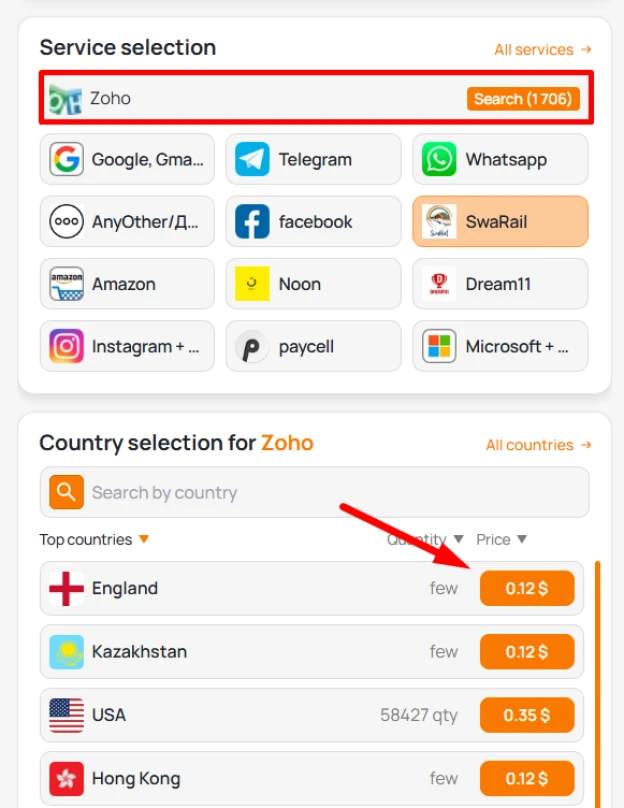
4. Buy the number — the cost will be deducted automatically
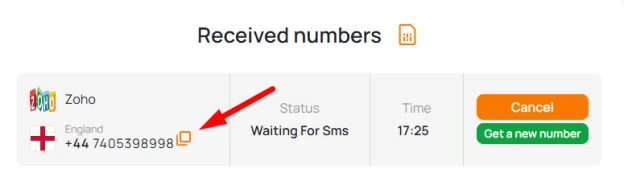
5. Receive the Zoho verification code in your Grizzly SMS account
6. Enter the code on Zoho and complete the registration
That’s it! You now have a fully functional Zoho account linked to a temporary number, without using your personal SIM card.