









Quantity
 |
Price
|
| Available 20 qty | |
| Available 4922 qty |


Quantity
|
Price
|
| Available 92 qty |

Quantity
|
Price
|
| Available 100 qty | |
| Available 226 qty |

Quantity
|
Price
|
| Available 211 qty | |
| Available 812 qty |

Quantity
|
Price
|
| Available 28 qty | |
| Available 20 qty |

Quantity
|
Price
|
| Available 52 qty | |
| Available 4543 qty |


Quantity
|
Price
|
| Available 27 qty | |
| Available 64 qty |

Quantity
|
Price
|
| Available 1 qty | |
| Available 2290 qty |

Quantity
|
Price
|
| Available 175 qty | |
| Available 2955 qty |

Quantity
|
Price
|
| Available 1792 qty | |
| Available 1392 qty |

Quantity
|
Price
|
| Available 5835 qty | |
| Available 26716 qty |

Quantity
|
Price
|
| Available 20 qty | |
| Available 130 qty |

Quantity
|
Price
|
| Available 285 qty | |
| Available 6846 qty |

Quantity
|
Price
|
| Available 7657824 qty | |
| Available 3052 qty |

Quantity
|
Price
|
| Available 214 qty | |
| Available 4820 qty |
Quantity
|
Price
|
| Available 7091 qty | |
| Available 145 qty |

Quantity
|
Price
|
| Available 3203 qty | |
| Available 1847 qty |

Quantity
|
Price
|
| Available 20 qty | |
| Available 384 qty |


Quantity
|
Price
|
| Available 113 qty | |
| Available 103 qty |


Quantity
|
Price
|
| Available 20 qty | |
| Available 358 qty |


Quantity
|
Price
|
| Available 315 qty | |
| Available 31 qty |


Quantity
|
Price
|
| Available 307 qty | |
| Available 749 qty |


Quantity
|
Price
|
| Available 206 qty | |
| Available 80 qty |


Quantity
|
Price
|
| Available 46 qty | |
| Available 85 qty |


Quantity
|
Price
|
| Available 20 qty | |
| Available 20 qty |


 Countries with a high % delivery
 Select country


Virtual Phone Number for Google Verification
Creating a Gmail account often requires linking a mobile number for security. However, not everyone wants to share their real phone number. Whether for privacy reasons or to manage multiple accounts, using a temporary phone number for Gmail verification can be the perfect solution.
A virtual phone number allows you to verify your Google account without exposing your personal information. It’s fast, convenient, and secure. With services like Grizzly SMS, you can instantly receive SMS online for Gmail verification and continue creating your Google account without using a personal SIM card.
This approach works both for Gmail signups and broader Google account verification scenarios.
Why Use a Virtual Phone Number for Gmail?
Using a virtual phone number for Gmail verification allows you to complete Google account signup without exposing your personal phone number. This approach is commonly used by users who value privacy, manage multiple accounts, or work across different regions.
Key benefits include:
-
Protect your privacy — your personal mobile number stays private
-
Manage multiple Gmail accounts for business, testing, or personal use
-
Verify Gmail in regions with limited SMS delivery
-
Avoid spam and unwanted calls linked to personal numbers
A virtual solution such as Grizzly SMS makes it possible to receive verification codes online and proceed with Gmail registration smoothly.
How to Verify Your Gmail Account with a Temporary Number
Using a temporary phone number for Gmail verification is straightforward and does not require any technical setup.
Follow these steps:
-
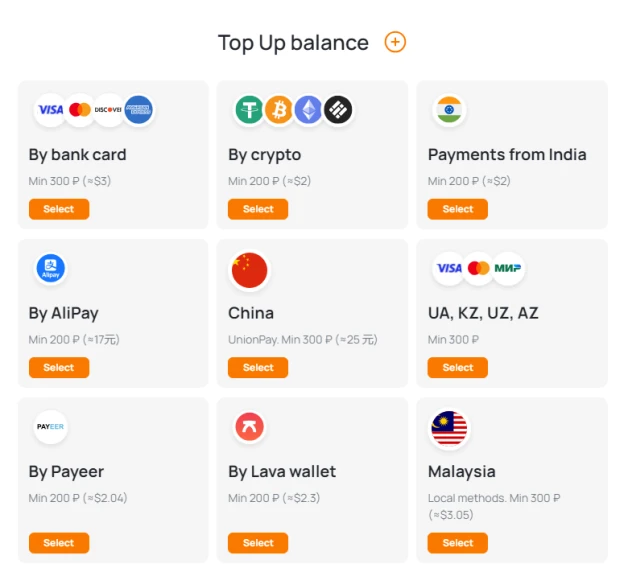
Create an account on the Grizzly SMS platform and add balance.
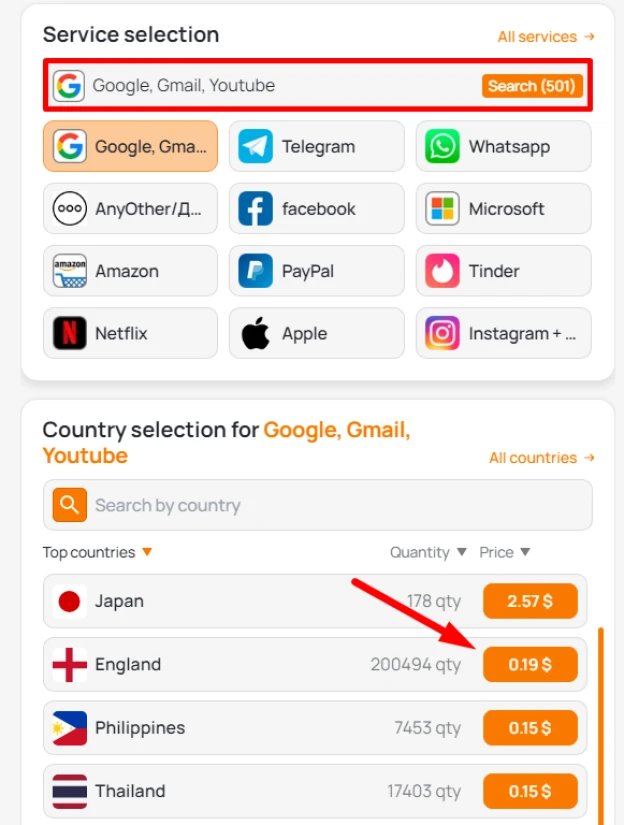
2. Select Google as the service and choose a country.
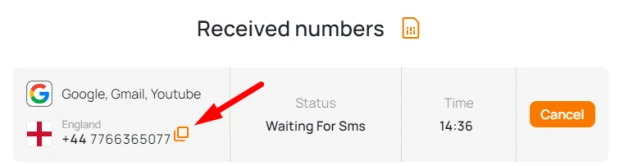
3. Copy the temporary phone number provided.
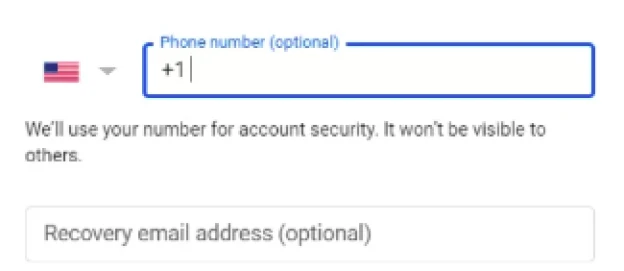
4. Go to the Gmail signup page and enter the number when prompted.
5. Receive the SMS verification code online.
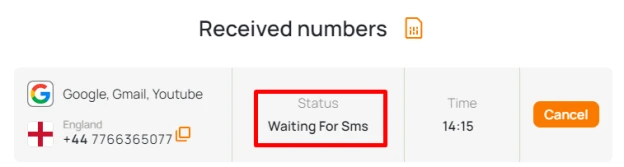
6. Enter the code on Google and complete registration.
The entire process takes just a few minutes and works on both desktop and mobile devices.
Using US and Indian Phone Numbers for Google and Gmail Verification
When verifying Google or Gmail accounts with a virtual phone number, the selected country plays an important role. Acceptance rate, SMS delivery speed, and verification stability can vary depending on the region.
Among the most reliable options are US and Indian phone numbers, each suited for different verification scenarios.
US Phone Numbers for Gmail and Google Verification
A temporary US phone number for Gmail verification is widely used due to its high trust level and consistent SMS delivery. Google generally treats US-based numbers as reliable, which reduces the chance of additional verification steps during signup.
US numbers are commonly chosen when:
-
creating Gmail accounts for long-term use
-
verifying Google accounts with stricter trust requirements
-
avoiding regional SMS delivery issues
In most cases, verification codes sent to US virtual numbers arrive quickly and without delays. This makes temp US numbers for Google verification a stable option for both individual and business-related registrations.
Indian Phone Numbers for Gmail and Google OTP Verification
Indian phone numbers are especially popular for receiving OTP for Gmail and Google account verification. Due to their availability and cost efficiency, India is often used when multiple accounts or scalable verification is required.
Indian OTP numbers are commonly used for:
-
receiving Gmail OTP during account registration
-
verifying Google accounts in bulk or test environments
-
situations where quick number replacement is needed
If an OTP is not delivered or a number has been used previously, switching to another Indian number usually resolves the issue immediately. This flexibility makes Indian OTP numbers for Gmail and Google verification a practical choice for high-volume or budget-sensitive use cases.
Advantages of Using Grizzly SMS for Gmail and Google Verification
Using a reliable SMS verification service is essential when creating or verifying Gmail and Google accounts without a personal phone number. Grizzly SMS is designed to make this process simple, secure, and predictable.
Key advantages include:
-
Fresh and regularly updated phone numbers
Numbers are rotated frequently, reducing the risk of reuse or rejection during verification. -
Fast SMS delivery
Verification codes usually arrive within seconds, minimizing delays during Gmail or Google account signup. -
No app installation required
All messages are received online through a browser, making the service accessible from any device. -
Privacy-focused verification
Gmail and Google accounts can be verified securely without exposing a personal phone number.
This approach is especially useful for users who need reliable verification across different countries and use cases.
Alternatives and Practical Tips for Using Temporary Phone Numbers for Gmail and Google Verification
Free SMS services are often advertised as an easy alternative, but they come with significant limitations. Common issues include reused numbers, delayed messages, and a higher chance of verification failure.
Compared to free platforms, paid temporary number services offer:
-
higher acceptance rates
-
better delivery reliability
-
improved privacy protection
To improve success when verifying Gmail or Google accounts, consider the following tips:
-
Always add a recovery email address after registration
-
Avoid using temporary numbers for sensitive financial services
-
Do not reuse the same number for multiple accounts
-
Complete account setup and security settings immediately after verification
Following these practices helps maintain account stability and reduces the risk of future access issues.