









Quantity
 |
Price
|
| Available 2233 qty | |
| Available 172 qty |


Quantity
|
Price
|
| Available 40 qty |

Quantity
|
Price
|
| Available 100 qty | |
| Available 2785 qty |

Quantity
|
Price
|
| Available 140 qty | |
| Available 77 qty |

Quantity
|
Price
|
| Available 315 qty | |
| Available 20 qty |

Quantity
|
Price
|
| Available 20 qty | |
| Available 38 qty |


Quantity
|
Price
|
| Available 20 qty | |
| Available 43 qty |

Quantity
|
Price
|
| Available 366 qty | |
| Available 1020 qty |

Quantity
|
Price
|
| Available 104 qty | |
| Available 5172 qty |

 Countries with a high % delivery


 Select country


Buy a Temporary Number for SMS Verification on Noon
Noon.com is a large e-commerce platform popular in the Middle East countries like the UAE, Saudi Arabia, and Egypt. It offers a wide range of products including electronics, fashion, cosmetics, home appliances, and more.
However, during registration, Noon requires a local phone number, which can be a problem for users from other countries.
Solution? A Virtual Number for Noon from Grizzly SMS! With it, you can create an account on the marketplace without needing to buy a local SIM card.
Virtual Number for Noon.com from Grizzly SMS
If you don't have a local number from the UAE, Saudi Arabia, or Egypt, virtual numbers from Grizzly SMS can help you bypass this limitation. It's a convenient and quick way to sign up for Noon without needing a personal phone.
Benefits of a Temporary Number for Noon from Grizzly SMS:
- Availability of numbers for different countries, including the UAE and Saudi Arabia.
- Quick receipt of the SMS verification code.
- Complete anonymity – your real number won't be exposed anywhere.
- Cost savings – no need to buy a local SIM card.
Now, let's go through the registration process step by step!
How to Get a Virtual Number for Noon on the Grizzly SMS Website
- Go to the Grizzly SMS website.
- Sign up and top up your balance.
- From the list of services, select Noon. Choose a country (for example, the UAE, Saudi Arabia, or Egypt). Buy a virtual number.
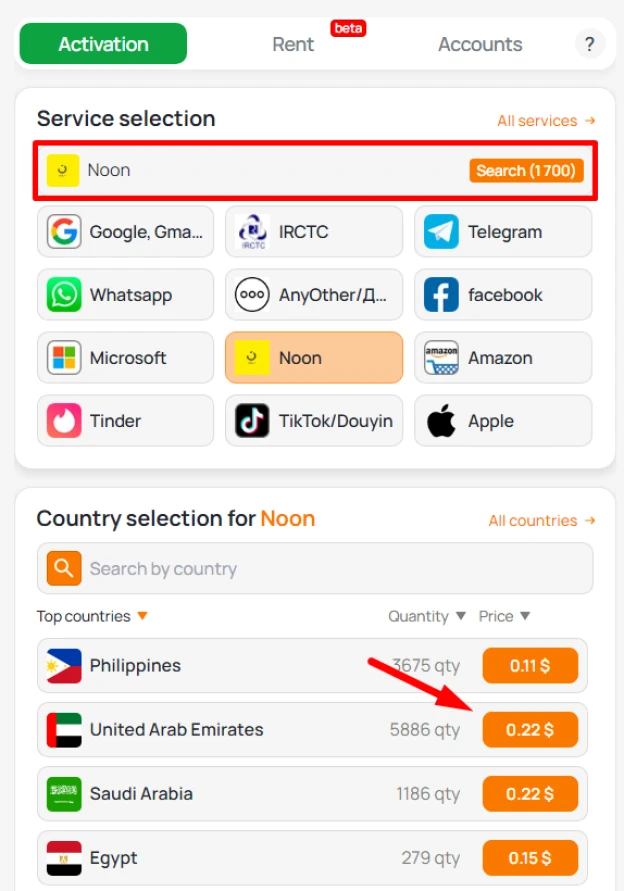
4. Open the Noon registration page. Fill out the registration form and create your account.
5. After filling out the form with your email, name, and password, the system will ask you to enter your phone number to receive the SMS verification code. Copy the number from the Grizzly SMS site.
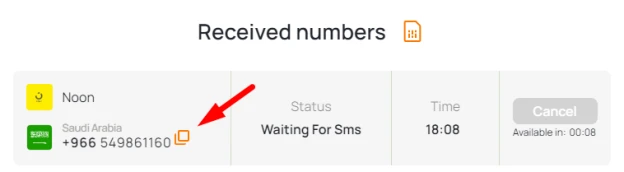
6. Once the SMS is sent to it, go back to the Grizzly SMS website and copy the verification code.
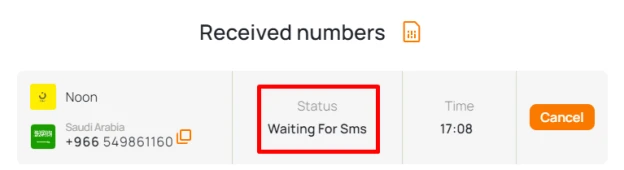
Done! Your Noon account is now created, and you can take advantage of all the marketplace features. Thanks to the virtual number from Grizzly SMS, you were able to register without any hassle.