









Quantity
 |
Price
|
| Available 20 qty | |
| Available 42 qty |


Quantity
|
Price
|
| Available 40 qty |

Quantity
|
Price
|
| Available 80 qty | |
| Available 4118 qty |

Quantity
|
Price
|
| Available 181 qty | |
| Available 397 qty |

Quantity
|
Price
|
| Available 43 qty | |
| Available 20 qty |

Quantity
|
Price
|
| Available 20 qty | |
| Available 37 qty |


Quantity
|
Price
|
| Available 23 qty | |
| Available 102 qty |

Quantity
|
Price
|
| Available 1 qty | |
| Available 150 qty |

Quantity
|
Price
|
| Available 106 qty | |
| Available 4404 qty |


Get a UK Number to Verify Telegram Without a SIM Card
Let’s be honest — sometimes the easiest way to solve a problem is to start fresh. Telegram keeps growing, and for many users a Telegram UK phone number is more than just a formality. UK-based accounts are often needed for work chats, business projects, or simply to separate personal and professional communication.
But here’s where it usually gets stuck: Telegram asks for a UK number for Telegram verification, and not everyone has a spare British SIM card lying around. That’s exactly why virtual numbers have become such a practical workaround — and why you’re here.
Creating a new Telegram account privately is easy with Grizzly SMS. The service offers affordable numbers, a wide range of countries and platforms, full anonymity, flexible payment options, and responsive human support. No noise, no pressure — just a tool that does its job.
UK virtual number for Telegram: why it works so well
Here’s the neat part: Telegram doesn’t distinguish between physical and virtual numbers. If the number can receive Telegram SMS UK, it’s accepted. That’s why a UK virtual number for Telegram works just as reliably as a traditional SIM.
Instead of gambling with reused public numbers, you get a clean UK number intended specifically for verification. Fewer errors, fewer retries, and no awkward detours.
Telegram SMS verification UK: common reasons to use it
That’s just one option — here’s another perspective. People use Telegram SMS verification UK for many legitimate reasons, including:
- registering business or work-related accounts
- managing multiple Telegram profiles
- avoiding limits on repeated registrations
- keeping personal numbers private
In all these cases, a temporary UK number for Telegram keeps things simple and controlled.
Buy UK number for Telegram or try free services?
Before we move on, there’s one more detail worth mentioning. Free number services often look appealing, but they tend to fail at the worst possible moment. Codes don’t arrive, numbers are already blocked, and time gets wasted.
When you buy a UK number for Telegram, you’re choosing predictability. A paid UK SMS number for Telegram means stable delivery, cleaner numbers, and clear guarantees if something goes wrong.
How to get Telegram verification UK with Grizzly SMS
You don’t need to be a tech wizard to figure this out. Everything happens in your browser — no SIM cards, no apps, no complicated setup.
Step-by-step:
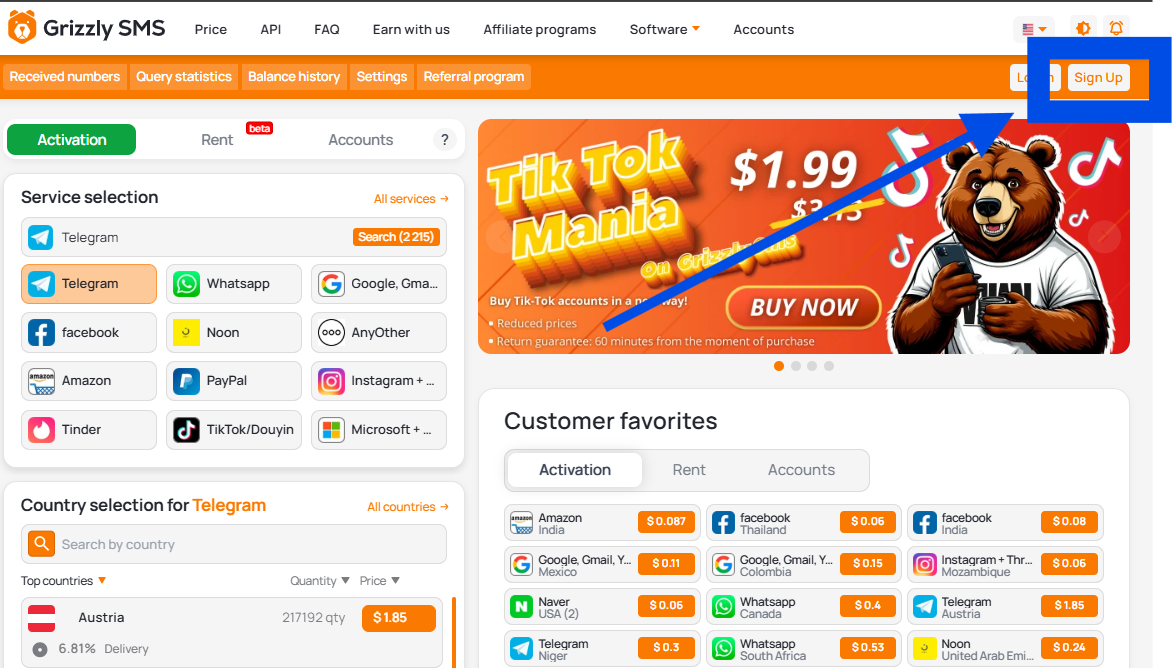
- Register on Grizzly SMS
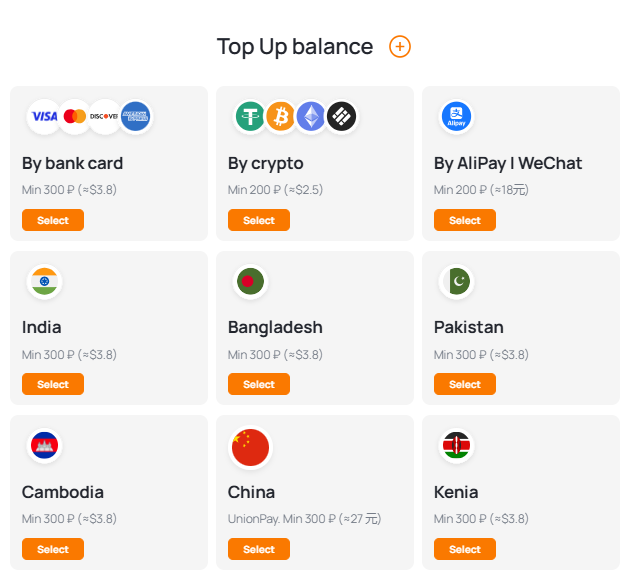
- Top up your balance using a convenient payment method
- Select Telegram
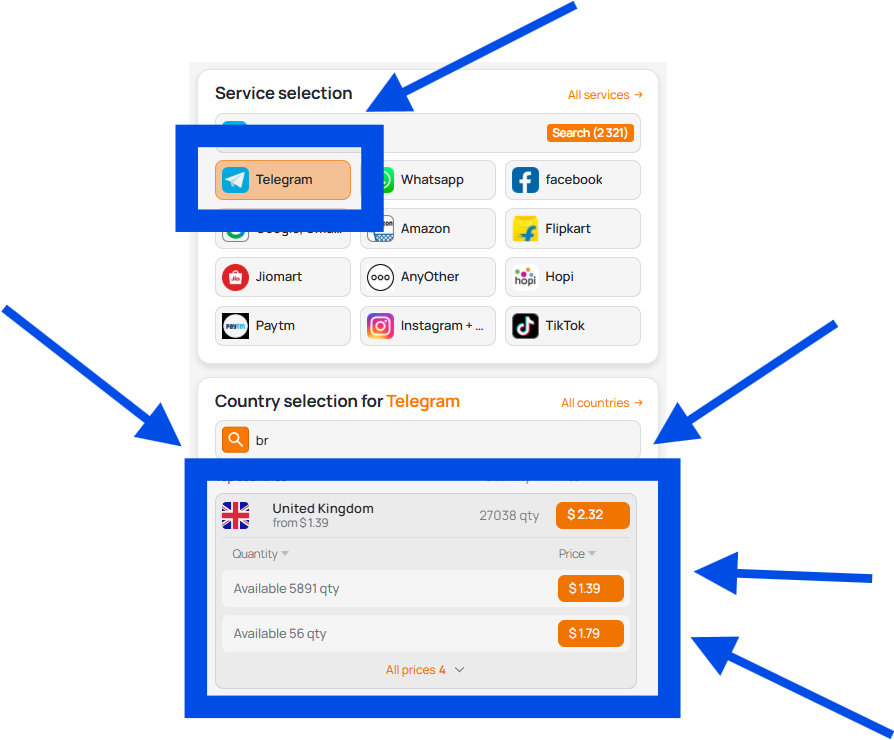
- Choose United Kingdom as the country
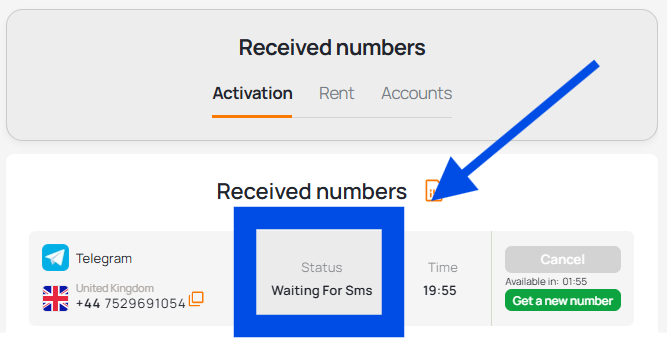
- Get the number and copy it
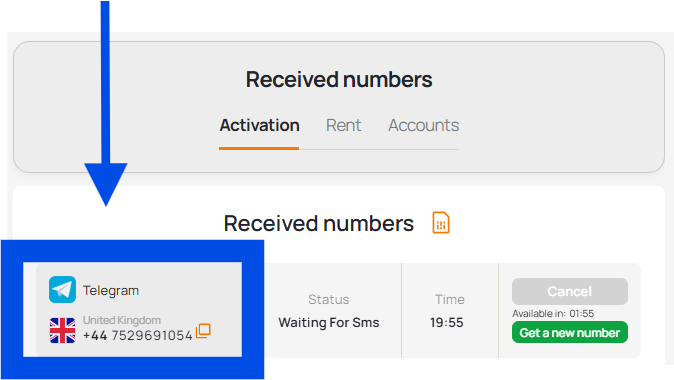
- Enter it during Telegram registration with UK number
- Receive the code in your dashboard and complete verification
Now that you’ve got the idea, let’s make it practical.
Benefits of Using a Temp Phone Number for Telegram
- Instant number activation
- No need to buy a SIM card or install apps
- Strong compatibility with global platforms
- Minimal cost — pay only for what you use
- Full anonymity
- Simple and intuitive interface
- Access from anywhere in the world
Grizzly SMS vs Free Numbers
|
Criteria |
Grizzly SMS |
Free Number Services |
|
SMS Delivery |
Stable and fast, usually within 10–20 seconds |
Delays and frequent failures |
|
Number Quality |
Clean numbers with guaranteed SMS delivery |
Reused, blocked, or non-working |
|
Privacy |
Full anonymity |
Risk of data leaks |
|
Convenience |
Clear, user-friendly interface |
Confusing and outdated interfaces |
|
Support |
Live support with real people |
Minimal support or bots |
|
Security |
Reduced risk of spam and fraud |
Higher risk of scams |
|
Guarantees |
Free replacement if SMS doesn’t arrive |
No guarantees |
In most situations, the advantages of Grizzly SMS turn out to be decisive.
Final thoughts
If you’re ready to give it a try, getting a UK number for Telegram verification takes less time than you might expect. No stress, no extra steps — just a smooth way to set up your account using Grizzly SMS.