






WhatsApp Business Registration Code Not Arriving? Troubleshoot It and Protect Your Work Number
A missing registration code can involve number eligibility, connectivity, call blocking or a retry timer. Identify the verification screen first, check the supported delivery methods, and keep lasting control of the number used for your business account.
First identify the screen: registration code or two-step verification?
When a WhatsApp Business code does not arrive, first check what the app is actually requesting. The registration screen asks for a six-digit code that confirms ownership of your phone number. The two-step verification screen appears after successful phone-number registration and asks for an additional security credential. Waiting for another SMS will not resolve a forgotten two-step verification credential.
WhatsApp is upgrading its six-digit two-step verification PIN to a password, so an existing account may still show a PIN while another account shows a password. These are different from the registration code sent for a particular registration attempt. Read the screen label rather than treating every six-digit prompt as the same thing.
A newly acquired number may also have two-step verification enabled by its previous owner. In that situation, use WhatsApp’s reset guidance and follow the waiting period shown in the app rather than assuming a fixed reset time. Never guess registration codes: incorrect guesses can lock you out for a period. *
Check whether the number is eligible for WhatsApp Business
WhatsApp requires an active phone number that you own and can use to receive verification. An eligible mobile number is the usual starting point. VoIP, toll-free, premium-rate and universal access numbers are unsupported. A number’s country or ability to receive an ordinary text does not, by itself, establish that WhatsApp supports its number type.
Landlines are an important exception: they are supported in the WhatsApp Business app, but not in the ordinary WhatsApp app. For a business landline that cannot receive texts, the phone-call option is the relevant delivery method when available. You still need to be able to receive the verification call at that number.
If you want to use WhatsApp Business and ordinary WhatsApp, use a distinct phone number for each app. Do not interpret that requirement as a universal limit on every account arrangement or device feature. This guide covers the Android and iOS app registration flow across markets; it does not establish a supported-country list for any third-party SMS service. *
Diagnose a missing SMS in a clear order
Start with the number entered in the registration form. Select the correct country and check the complete international number before requesting another code. A wrong country selection or mistyped digit sends verification toward the wrong destination, and repeated requests cannot correct the underlying entry.
Next, check the phone and app environment. Use the latest version of WhatsApp Business on a supported phone, and make sure the device is not jailbroken. WhatsApp warns against registering on unsupported devices, such as an iPad. Avoid treating a registration failure on an unsuitable device as evidence that the number itself is unusable.
Then separate internet connectivity from telephone delivery. Open a web page to check that mobile data or Wi-Fi works. WhatsApp needs a working internet connection for registration, while the number must also be able to receive the SMS or call. Roaming or a poor connection can interfere, so a working browser is useful evidence but not proof that telephone delivery is functioning.
Finally, wait for the registration progress bar or displayed timer to finish. WhatsApp says waiting times vary and usually take a few minutes. Once another request becomes available, use the app’s Didn’t receive a code? option to request the offered delivery method. Enter the code for the current attempt; registration codes change when registering a new number or device. *
Use the call option without creating another obstacle
If SMS does not arrive and the app offers Phone call, use that option after the waiting period ends. Before requesting it, disable call-blocking settings, call-blocking apps and task killers, as WhatsApp’s registration requirements specify. The purpose is to allow the verification process to complete, not to keep protections switched off indefinitely.
Make sure you can actually answer calls to the registered number. This matters particularly for a business line that someone else normally handles: access to the company’s internet connection is not the same as access to its telephone calls. Arrange for the responsible person to receive the call without sharing the code through an unnecessary chain of people.
Your carrier may charge for verification SMS or calls. If neither delivery method works after these checks, clarify with the carrier whether the number can receive the relevant traffic, then use WhatsApp’s registration help. Repeatedly switching between SMS and calls is not a substitute for resolving a delivery restriction. *
Know where email and passkeys fit into sign-in
Email can be useful when signing back into an existing account, but it is not a general replacement for phone-number registration. WhatsApp describes email delivery of a registration code when an email address was previously added and verified. An address you can access today does not automatically qualify if it was never associated with the account.
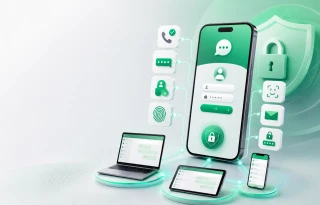
After registering the number and setting up the profile, WhatsApp allows you to create a passkey. A passkey uses a fingerprint, face or screen lock to verify identity. Set it up through the account’s available settings rather than assuming it exists simply because the phone supports biometric unlocking.
Treat these features as additional account-access tools, not proof that you can abandon the registered number. Their availability depends on your account setup and the options presented during sign-in. For a broader introduction, read WhatsApp Authentication in 2026: Phone Numbers Remain Central, but Sign-In Options Are Expanding at https://grizzlysms.com/blog/whatsapp-authentication-in-2026-b. *
Keep lasting control of your business number
For a customer-facing account, number selection is an access decision, not just a way to get through today’s registration screen. Choose a number your business can continue to control, with reliable access to its incoming verification messages or calls. Temporary access to an SMS inbox does not establish ownership or permanent recovery access.
Keep the registered number active and make responsibility for it clear within the business. Also maintain access to any verified account email and security credentials you configure. Never share the registration code, two-step verification PIN or password with anyone; these credentials should not become routine information passed between staff.
A number with a previous owner can bring an unexpected two-step verification prompt, while losing control of your own number can make future re-registration difficult. Successfully receiving one code does not erase those risks. Where separate personal and business apps are needed, plan distinct numbers deliberately. Related reading is available at https://grizzlysms.com/blog/running-multiple-whatsapp-accounts-what-matters. *
Prepare for a new phone and know when to seek help
Before changing phones, check that you still control the registered number and any previously verified email. Re-registering an existing account is a registration event, so do not assume that being signed in on the old phone guarantees access on the new one. Follow the options actually offered by WhatsApp on the replacement device.
After number registration, follow the on-screen steps to restore an existing account or set up a new one. Registration and restoration are separate stages: receiving a code confirms the number, but does not itself demonstrate that your conversation history has been restored.
If registration remains blocked, use WhatsApp’s help for the stage where it fails. Note whether the issue is SMS delivery, a verification call, an expired timer or a two-step verification prompt, and describe the error without including any security credentials. A precise description is more useful than repeatedly requesting another code. *
FAQ
Can I use a VoIP number? WhatsApp lists VoIP numbers as unsupported. An SMS service listing does not override that requirement.
Can a landline work with WhatsApp Business? Yes, landlines are supported in the Business app. You need access to the verification call when that option is offered.
Why does requesting another code not help? Another request does not fix an incorrect number, blocked delivery or an unsupported number type. Wait for the displayed timer before retrying.
How is a PIN different from a registration code? The registration code verifies the phone number for registration. A two-step verification PIN, or its newer password equivalent, is an additional account-security credential.
Will email or a passkey guarantee recovery? No. Email verification depends on prior account setup, and a passkey should not be treated as guaranteed recovery after losing control of the number. *
Short registration and access checklist
Identify the verification screen.
Confirm number eligibility.
Check the international number.
Update WhatsApp Business.
Test the internet connection.
Check incoming SMS and calls.
Disable verification-blocking settings.
Wait for the displayed timer.
Use an offered delivery method.
Keep control of the business number.
Protect your security credentials. *
Choosing a service and country on GrizzlySMS
The GrizzlySMS WhatsApp service page is https://grizzlysms.com/whatsapp. Before choosing a service and country, establish compatibility with WhatsApp Business and check the number type against WhatsApp’s requirements. A service label, country option or available number is not a guarantee that WhatsApp will accept registration.
Check current country availability directly rather than assuming every market is served. For an ongoing work account, prioritize ownership and lasting control of the number over a one-time code. Temporary-number access is not a substitute for a recovery plan, and unsupported numbers should not be used as a workaround. *