


Quantity
 |
Price
|
| Available 100 qty | |
| Available 20 qty |

Quantity
|
Price
|
| Available 58 qty | |
| Available 437 qty |


Quantity
|
Price
|
| Available 20 qty | |
| Available 20 qty |


Quantity
|
Price
|
| Available 120 qty | |
| Available 7971 qty |


Quantity
|
Price
|
| Available 20 qty | |
| Available 20 qty |


 Countries with a high % delivery
 Select country


Quantity
|
Price
|
| Available 100 qty | |
| Available 20 qty |
Temp Number for Microsoft: Fast and Private SMS Verification
Need to verify your Microsoft account but prefer not to use your personal phone number? With Grizzly SMS, you can use a temp number for Microsoft to quickly and safely receive verification codes online.
Why Use a Temp Number for Microsoft?
Using a virtual number is the perfect solution when you want to protect your privacy, avoid spam, or simply test Microsoft services. Whether you’re setting up two-step verification, creating a new account, or changing your existing phone number, a temporary number offers flexibility and ease.
With Grizzly SMS, you can:
-
Receive SMS codes instantly
-
Verify your Microsoft profile securely
-
Avoid linking your real mobile number
-
Stay anonymous while using apps like Teams, Outlook, and others
How to Get a Microsoft Verification Code with Grizzly SMS
Getting started is simple. Just follow these steps:
- Log in on our website or create a new account;
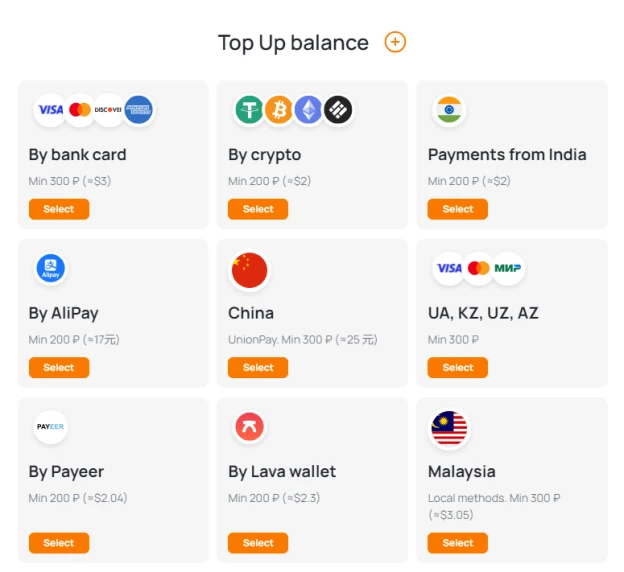
2. Top up your balance as you see fit using any of the payment options;
3. Go to the store page to choose from a wide selection of numbers;
4. Use filters to select services and geographical locations.

5. Copy and enter the number when signing up or updating your Microsoft account.
6. Wait for the SMS to be sent, then receive the verification code directly on the platform.
7. Use the code to complete setup or login.
It’s fast, safe, and doesn’t require you to download any app or provide additional personal information.
Temp +91 Number for Outlook Verification
A temp +91 number for Outlook is suitable for users registering Microsoft or Outlook accounts in India. The +91 country code aligns with Indian account settings and local Microsoft services.
An Indian virtual number can be used for:
-
Creating a new Outlook email
-
Registering a Microsoft account
-
Receiving Outlook OTP codes
-
Enabling two-step verification
-
Account recovery confirmation
With a temporary +91 number, you receive the SMS verification code online instantly without linking your personal mobile number.
US Number for Outlook Verification
A US number for Outlook verification is commonly used when setting up a Microsoft account with a +1 country code. It is often preferred for international projects or US-based registrations.
A virtual US number works for:
-
New Outlook.com registrations
-
Microsoft account verification
-
Security login confirmations
-
Business-related Microsoft services
The SMS code is delivered online within seconds, allowing you to complete verification quickly without a physical SIM card.
When to Use a Temp Number?
A temp number is especially useful if:
-
You’re signing up for a new Microsoft account
-
You want to test how authentication works
-
You didn’t receive a code on your usual device
-
You need to change your phone number linked to Microsoft
-
You want to keep your email and personal data safe
If a code isn’t delivered on the first try, just change the number and try again — Grizzly SMS offers many active numbers for your convenience.
Try Grizzly SMS for Free and Stay Secure
Forget about blocked codes or complicated processes. At Grizzly SMS, we make verification easy. You can get a temp number in seconds, receive the code, and move on with your day.
No contracts. No hidden fees. Just fast, online SMS reception for Microsoft and many other platforms.
Try it now and experience a smarter way to verify your Microsoft account.