














































































































































































Activation
Rent beta
Accounts
?
Country selection for Telegram
All countries
Top countries icon-sort-name
Quantity icon-sort-count
Price icon-sort-price
icon
Lesotho
829 qty
icon
Chile from $ 0.5601
3709 qty
Quantity
Price
Available 20 qty
Available 945 qty
All prices 5
icon
Colombia from $ 0.3
7841 qty
Quantity
Price
Available 2306 qty
Available 99 qty
All prices 3
icon
Spain from $ 3.63
828 qty
Quantity
Price
Available 26 qty
Available 70 qty
All prices 4
icon
United Kingdom from $ 1.39
26538 qty
Quantity
Price
Available 20 qty
Available 6061 qty
All prices 4
icon
Japan
405 qty
icon
Kazakhstan from $ 0.75
4384 qty
Quantity
Price
Available 3333 qty
Available 20 qty
All prices 6
icon
United Arab Emirates
3774 qty
icon
Kuwait
2465 qty
icon
Turkmenistan from $ 0.26
1872 qty
Quantity
Price
Available 20 qty
Available 20 qty
All prices 4
icon
Brunei Darussalam
145 qty
icon
Turkey from $ 0.5
1222 qty
Quantity
Price
Available 382 qty
Available 86 qty
All prices 4
icon
Jamaica
935 qty
icon
Oman
963 qty
icon
Kyrgyzstan from $ 0.53
9427 qty
Quantity
Price
Available 310 qty
Available 20 qty
All prices 3
icon
Hungary
379 qty
icon
Albania
1014 qty
icon
New Caledonia
110 qty
icon
Bahrain
1469 qty
icon
Belgium
273 qty
icon
Norway from $ 0.61
716 qty
Quantity
Price
Available 617 qty
Available 1 qty
icon
Netherlands
719 qty
Available only by API
icon
Tunisia from $ 0.29
4781 qty
Quantity
Price
Available 787 qty
Available 3430 qty
All prices 4
icon
Croatia
2930 qty
icon
Slovakia
478 qty
icon
Guyana
155 qty
icon
Trinidad and Tobago
743 qty
icon
Suriname
153 qty
icon
Latvia
436 qty
icon
Cayman islands
169 qty
icon
Seychelles
746 qty
icon
Belarus from $ 1
7021 qty
Quantity
Price
Available 1036 qty
Available 20 qty
icon
Afghanistan
9176 qty
icon
Montenegro
634 qty
icon
North Macedonia
186 qty
icon
Switzerland
420 qty
icon
Lithuania
881 qty
icon
Mexico
1076 qty
icon
Iraq
3102 qty
icon
India
952 qty
icon
Argentina from $ 0.9
1912 qty
Quantity
Price
Available 21 qty
Available 473 qty
icon
Germany from $ 2.69
679 qty
Quantity
Price
Available 283 qty
Available 38 qty
icon
Taiwan
1114 qty
icon
Vietnam
10058 qty
icon
Hong Kong from $ 0.69
3646 qty
Quantity
Price
Available 1563 qty
Available 643 qty
All prices 4
icon
Philippines
1206 qty
icon
Morocco
2262 qty
icon
Thailand from $ 0.8101
6370 qty
Quantity
Price
Available 265 qty
Available 19 qty
All prices 5
icon
Pakistan
4466 qty
icon
USA
131666 qty
icon
Australia
57678 qty
icon
France
931 qty
icon
Kenya
1109 qty
icon
Canada
63645 qty
icon
Nicaragua
3752 qty
icon
Czech Republic
1193 qty
icon
Egypt
849 qty
icon
Indonesia from $ 0.26
17349 qty
Quantity
Price
Available 16452 qty
Available 12 qty
All prices 3
icon
Ukraine from $ 1
609 qty
Quantity
Price
Available 132 qty
Available 120 qty
All prices 5
icon
Georgia
3103 qty
icon
Austria
974 qty
icon
Bangladesh
1310 qty
icon
Qatar
823 qty
icon
Sri Lanka
890 qty
icon
Dominican Republic
759 qty
icon
Liberia
920 qty
icon
Malaysia
964 qty
icon
Myanmar
814 qty
icon
Saudi Arabia from $ 0.59
9326 qty
Quantity
Price
Available 6027 qty
Available 20 qty
icon
Uzbekistan from $ 0.7
896 qty
Quantity
Price
Available 20 qty
Available 7 qty
All prices 5
icon
Azerbaijan from $ 0.65
717 qty
Quantity
Price
Available 336 qty
Available 222 qty
All prices 4
icon
Mali
782 qty
icon
Mauritania
900 qty
icon
Mozambique
879 qty
icon
Poland from $ 2.25
1123 qty
Quantity
Price
Available 37 qty
Available 20 qty
All prices 3
icon
Bolivia
861 qty
icon
Estonia
1237 qty
icon
Israel
993 qty
icon
Panama
920 qty
icon
Romania from $ 1.69
6096 qty
Quantity
Price
Available 786 qty
Available 40 qty
icon
Uganda
878 qty
icon
Yemen
885 qty
icon
Zambia
3970 qty
icon
Burundi
1007 qty
icon
Cambodia
904 qty
icon
Cameroon
7966 qty
icon
Cape Verde
801 qty
icon
Chad
761 qty
icon
Ecuador
1213 qty
icon
Ethiopia
734 qty
icon
Gambia
828 qty
icon
Ghana
10013 qty
icon
Guinea
926 qty
icon
Malawi
992 qty
icon
Nepal
793 qty
icon
Niger
795 qty
icon
Republic of the Congo
540 qty
icon
South Africa
812 qty
icon
Zimbabwe
986 qty
icon
Algeria
1080 qty
icon
American Samoa
66 qty
icon
Angola
880 qty
icon
Anguilla
151 qty
icon
Antigua and Barbuda
44 qty
icon
Armenia from $ 0.189
831 qty
Quantity
Price
Available 2 qty
Available 90 qty
All prices 3
icon
Aruba
541 qty
icon
Bahamas
723 qty
icon
Barbados
879 qty
icon
Belize
1545 qty
icon
Benin
903 qty
icon
Bermuda
63 qty
icon
Bhutan
154 qty
icon
Bosnia and Herzegovina
1457 qty
icon
Botswana
888 qty
icon
Brazil from $ 0.7
527865 qty
Quantity
Price
Available 482 qty
Available 10 qty
All prices 4
icon
Bulgaria
632 qty
icon
Burkina Faso
104 qty
icon
Central African Republic
116 qty
icon
China
80 qty
icon
Comoros
815 qty
icon
Costa Rica
757 qty
icon
Cuba
48 qty
icon
Cyprus from $ 2.75
1023 qty
Quantity
Price
Available 23 qty
Available 543 qty
All prices 3
icon
DR Congo
155 qty
icon
Denmark
902 qty
icon
Djibouti
109 qty
icon
Dominica
109 qty
icon
Equatorial Guinea
306 qty
icon
Eritrea
678 qty
icon
Finland
1078 qty
icon
French Guiana
132 qty
icon
Gabon
912 qty
icon
Gibraltar
80 qty
icon
Greece from $ 0.375
1269 qty
Quantity
Price
Available 315 qty
Available 235 qty
All prices 4
icon
Grenada
734 qty
icon
Guadeloupe
713 qty
icon
Guatemala
900 qty
icon
Guinea-Bissau
837 qty
icon
Haiti
775 qty
icon
Honduras
1101 qty
icon
Iceland
861 qty
icon
Ireland
433 qty
icon
Italy
1073 qty
icon
Ivory Coast
83 qty
icon
Jordan
1572 qty
icon
Kosovo
44 qty
icon
Laos
896 qty
icon
Lebanon
688 qty
icon
Libya
821 qty
icon
Luxembourg
110 qty
icon
Macao
839 qty
icon
Madagascar
103 qty
icon
Maldives
855 qty
icon
Mauritius
727 qty
icon
Moldova from $ 0.45
1563 qty
Quantity
Price
Available 1476 qty
Available 20 qty
All prices 4
icon
Monaco
252 qty
icon
Mongolia
846 qty
icon
Montserrat
132 qty
icon
Namibia
131 qty
icon
New Zealand
1045 qty
icon
Nigeria
873 qty
icon
Niue
84 qty
icon
Papua new gvineya
922 qty
icon
Paraguay
781 qty
icon
Peru
910 qty
icon
Portugal
755 qty
icon
Puerto Rico
133 qty
icon
Reunion
133 qty
icon
Rwanda
926 qty
icon
Saint Kitts and Nevis
764 qty
icon
Saint Lucia
90 qty
icon
Saint Vincent
92 qty
icon
Salvador
532 qty
icon
Samoa
44 qty
icon
Sao Tome and Principe
948 qty
icon
Senegal
877 qty
icon
Serbia
717 qty
icon
Sierra Leone
7010 qty
icon
Slovenia
1097 qty
icon
Somalia
851 qty
icon
South Sudan
814 qty
icon
Swaziland
517 qty
icon
Sweden
974 qty
icon
Syria
60 qty
icon
Tajikistan
846 qty
icon
Tanzania
828 qty
icon
Timor-Leste
927 qty
icon
Togo
985 qty
icon
Tonga
44 qty
icon
USA (2) from $ 0.35
73428 qty
Quantity
Price
Available 68557 qty
Available 426 qty
icon
Uruguay
758 qty
icon
Venezuela
516 qty
blog-img

Using Chat GPT in Excel

The spreadsheet editor known to many is a very convenient and versatile tool that should be started in kindergarten. And while the curriculum is not yet adjusted, there is an interesting way to compensate for gaps in knowledge of the application's functionality from Microsoft. And the talkative bot from another American company, Open AI, will help us with this. So today we are analyzing the integration of the GPT chat in Excel.

Before accessing the capabilities of the service based on the neural network, you will need to register. Here you will find virtual phone numbers that you can use to create a working account in any OpenAI service. This is inexpensive with guaranteed SMS receipt, and also completely anonymous, try it!

Excel GPT: How to use neural networks to process tabular data?

To use GPT (Generative Pre-trained Transformer) in Excel, you will need to take several steps, including exporting data from the spreadsheet, processing it through a model based on artificial intelligence (e.g. GPT-3,5), and then importing the generated results back into the spreadsheets. This process involves several stages and may require coding or the use of certain software.

Here is a simplified overview of how you can approach solving the general problem and use the chat GPT for Excel:

  1. Data export. Extract the data you want to process using the chatbot from Excel into a format that can be used by the GPT model. This could be a CSV file or any other compatible format.
  2. Use the GPT model. Use the neural network to process the data and generate the required results. This usually involves writing code in a programming language like Python and using libraries such as OpenAI's GPT API to interface with the GPT Excel model.
  3. Process results. After getting the generated results from the GPT model, additional processing or analysis may be required according to your needs.
  4. Import results. Finally, import the processed results back into Excel for further analysis, visualization, or any other use.

Chat GPT Excel: Additional tips

Here are some additional tips to increase your productivity with chat GPT in excel:

  • Programming language. Python is often used to interface with GPT models and manipulate data. Libraries like OpenAI's GPT API or Hugging Face's Transformers can be helpful for finding optimal solutions when working with large datasets.
  • Data processing. Make sure the data you are working with is properly formatted and prepared for processing with the Chat GPT Excel model. This may require tweaking, pre-processing, or transforming the data as needed.
  • API access. If you are using an API to interface with the GPT model (e.g. OpenAI's API), make sure you have the proper credentials and permissions.
  • Security considerations. Be mindful of any confidential data you are working with and take appropriate measures to protect it, especially when using cloud APIs or services.

Remember that working with GPT in Excel models may not be as straightforward as using more traditional functions or spreadsheet tools. It typically involves some level of programming and data manipulation outside of Excel, so be prepared to pick up new knowledge and skills.

Alternative: GPT EXCEL
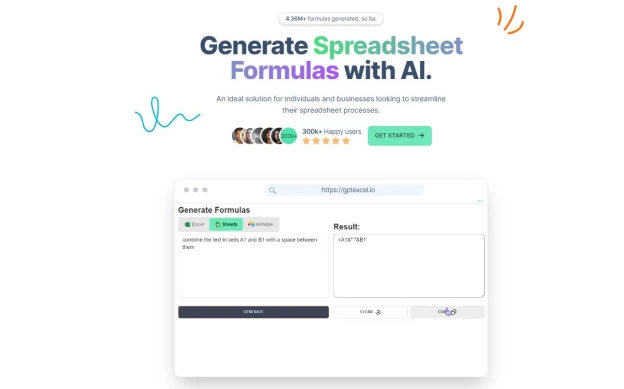
Since using formulas is a key function for boosting efficiency in Excel, let's discuss them in more detail today, in particular, let's look at the capabilities of the GPT Excel neural network. This is an artificial intelligence service that can generate any formula you need. You just need to describe what you need, and the system will generate the corresponding formula. Here's how it works:

  1. Register on the website designed for using neural networks to generate spreadsheet formulas.
  2. Describe the formula you need in the left column of the site.
  3. Click "Generate" to generate the formula using the GPT Excel neural network.
  4. Use the generated formula in your Excel worksheets to perform the required calculations.
  5. Explore other useful features on this site, such as AI script generators: VBA, Apps Scripts, and Airtable Scripts, as well as SQL query generators - all this will help you work with data and increase your productivity.
  6. Configure and use the template generator to speed up and facilitate working with spreadsheets in Excel when needed.

Add a comment
Comments 0